Need to Open a TGZ File? Download WinRAR to Open Your TGZ Files Now!
A TGZ file is a GZIP compressed TAR archive. This means that files have been placed inside a TAR archive and then compressed using Gzip software.
How to Open TGZ Files
If you have a TGZ file to open, ensure that the GZ and TAR file extensions check boxes is ticked in the WinRAR Integration panel:
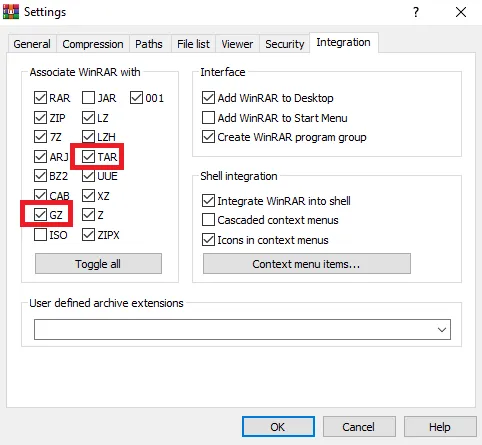
WinRAR can open TGZ extension by default Double-click on the file and it will be displayed in WinRAR. Choose the files you want to extract/open and click on the “Extract To” icon at the top of the WinRAR window:
Click “OK” and your TGZ file will be saved in your destination folder!
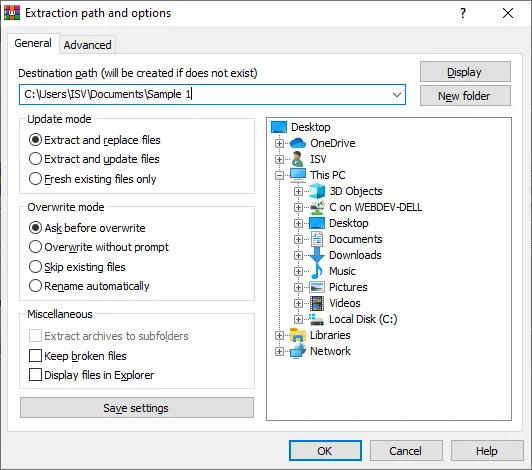
WinRAR can extract TGZ files
What is a TGZ File Extension?
A TGZ file is a GZIP compressed TAR archive. This means that files have been placed inside a TAR archive and then compressed using Gzip software. These files are generally only seen with software installers for Unix-based OS, such as MacOS, but can also be used for regular data archiving purposes.
WinRAR is the third most installed software after Google Chrome & Acrobat Reader, making it the World’s most popular compression file utility!